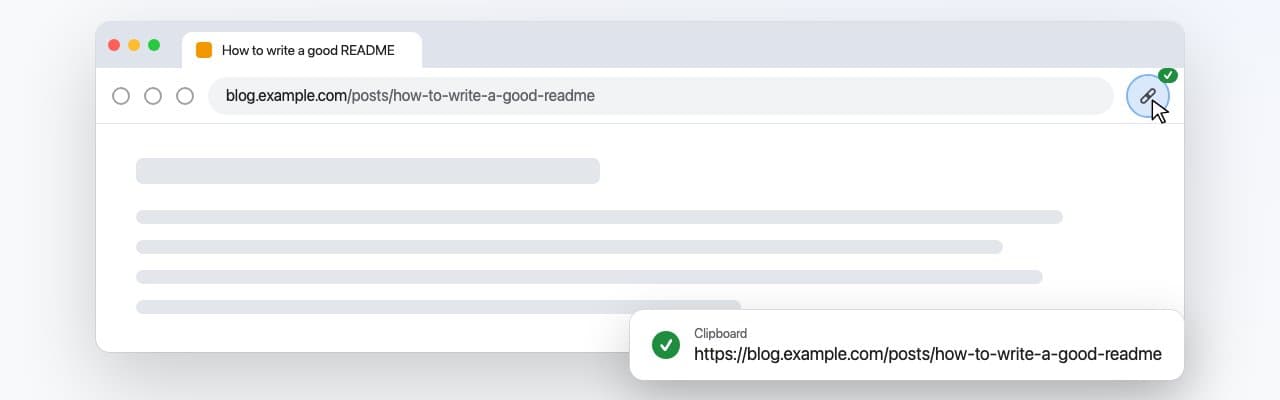
A Chrome extension that copies the current tab's URL to the clipboard in one click. No popup, no menu, no settings - a short check mark on the toolbar button confirms the copy, and the icon follows Chrome's light or dark theme.
- My role
- Author and maintainer
Project Overview
Copy Link exists because copying a link should not take a click into the address bar, a select-all and a copy, and because a tool that small has no reason to read the pages you visit. It asks for nothing it does not use: no telemetry, no analytics, no network requests, no storage. It works on every tab, chrome:// pages included, and a keyboard shortcut can be assigned in Chrome's own settings.
The extension in numbers
- Permissions
Three, none of them host access
activeTab, clipboardWrite and offscreen. The extension cannot read any page, only the URL of the tab the button was clicked on.
- Dependencies
None
Plain JavaScript on Manifest V3, no build step: the src/ folder is what gets loaded and what gets published.
Challenges
- Manifest V3 service workers have no clipboard access and no DOM, so the obvious navigator.clipboard call is not available where the click is handled.
- Service workers cannot run matchMedia either, so the extension has no direct way to know whether Chrome is in light or dark mode and pick a readable toolbar icon.
- Staying useful without the broad host permissions that copy-link extensions usually request, which is what makes users distrust them.
Solutions
- A hidden offscreen document performs the clipboard write with execCommand('copy'), because an offscreen document is never focused and the async Clipboard API refuses to work there.
- The same offscreen document watches prefers-color-scheme and reports theme changes back, so the service worker swaps between light and dark icon sets as Chrome's theme changes.
- The URL is read from the clicked tab through activeTab alone, which grants access to that one tab for that one click and nothing more.
- Success and failure are shown as a badge on the button (a check mark or an exclamation mark for about a second) instead of a notification or popup.
Key Features
- One click - no popup, no menus, the link is on the clipboard.
- Visual confirmation - a short check mark on the toolbar button, or an exclamation mark if the copy failed.
- Theme-aware icon - light and dark variants that follow Chrome's theme.
- Works on every tab, including chrome:// pages.
- Private by construction - no telemetry, no analytics, no network requests, no storage, no access to page content.
- Keyboard shortcut - assignable at chrome://extensions/shortcuts.
- Open source - MIT licensed, with a published privacy policy; installable from the Chrome Web Store.
Project Info
September 28, 2026
Technologies
Frontend
Security
DevOps & CI/CD
Need something like this?
Tell me what you are building and where it is stuck. I will tell you plainly whether it is work I should be doing.